2012-05-01

Proper Unicode Serbo-Croatian digraphs

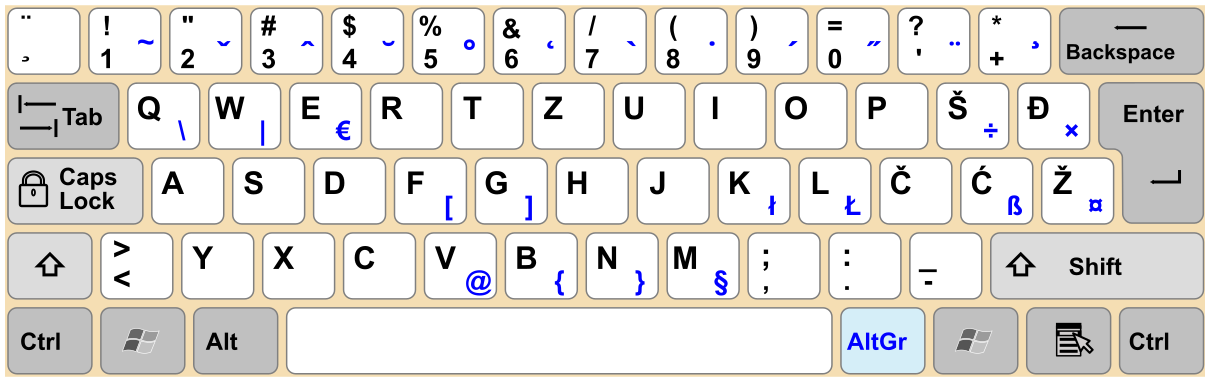
Here in ex-Yugoslavia we have three letters that are nearly never properly spelled out: digraphs "DŽ", "LJ" and "NJ" (Cyrillic corresponding letters are "Џ", "Љ" and "Њ". In fact, the standard Yugoslav keyboard doesn't even have corresponding keys:

Though in most fonts "NJ" (digraph, single letter) is visually [nearly] indistinguishable from "NJ" (letters "N" and "J"), some practical concerns still apply. Eg., the length of word "injekcija" in any case will be correctly counted, as it has two letters "n" and "j" (Cyr. "инјекција"), but the length of the word "njen" (Cyr. "њен") will depend on the way it is entered, and if it is spelled incorrectly, will be reported to be one letter longer and will get improperly sorted.

With the introduction of Unicode the digraphs received their own range: 0x01C4–0x01CC; so in theory we got a chance to fix the problem. Still, until yet to be released Windows 8 Microsoft's operating systems simply didn't render the single-letter Unicode versions digraphs, so using them in a wild was problematic.

The situation was quite a bit better in X11 environments: the "Unicode" family of XKB keymaps for Serbo-Croatian language1 maps these digraphs to the keys where Cyrillic counterparts can be found in standard layout. Still this approach isn't very useful, as it dismisses the one of the design goals of the Yugoslav keyboard layout standard: the ability to enter text in virtually any language – the digraphs replace letters "Q", "W" and "X", that are used quite extensively in English and many other languages.

As my needs demand being able to write also in English, French, German and Russian, I had three options:

  1. use two separate Latin layouts (one for digraphs, one for "Q", "W" and "X");
  2. create custom XKBlayout with some kind of magic;
  3. use Compose X11 extention to create the key mappings.

The first option was rejected from the very beginning: as i already have Cyrillic layout for typing in Russian (no native Latin alphabet to date, unfortunately), switching between three layouts would certainly create too much confusion to overcome the benefit of making less moves to get things done. The second option, while generally appealing (I already had to create a layout for typing Russian on Yugoslav keyboard without pain), had significant flow: unlike the rest of Latin letter the digraphs have 3 (yes, three) cases: lower, upper and title ("njen", "NJEN" and "Njen" respectively), so the letters can't be simply mapped to third level "L", "N" and "D".

So I was left with the only option to define my custom ~/.XCompose list:

<Multi_key> <D> <Zcaron> : U01c4
<Multi_key> <D> <zcaron> : U01c5
<Multi_key> <d> <zcaron> : U01c6
<Multi_key> <L> <J>      : U01c7
<Multi_key> <L> <j>      : U01c8
<Multi_key> <l> <j>      : U01c9
<Multi_key> <N> <J>      : U01ca
<Multi_key> <N> <j>      : U01cb
<Multi_key> <n> <j>      : U01cc

Given the fact that this solution allowed me to avoid relearning my Serbo-Croiatian typing skills (I just have to press a Compose2 key once before entering digraph), I would say that this solution is nearly perfect. The only caveat is the necessity of amending ~/.xsession script with the export GTK_IM_MODULE=xim (similar variable exists for Qt which I don't have).

Similarly the support for other weird Latin letters can be added if needed simply by amending this file.

P.S.: I'm still somehow uncomfortable with two features of standard Yugoslav keyboard: pressing 3 keys to emit "^" character drives me nuts. Though I don't use the "Ł" and "ł" letters, having them on different keys ("K" and "L" respectively) also seems insane. Probably it's time to make a dvorak-like layout for Serbo-Croatian...


1 The Special Olympics naming conventions for Serbo-Croatian language include "Bosnian", "Croatian", "Montenegrin" or "Serbian".

2 On my ThinkPad Edge E325 there is a PrtSc key next to AltGr; as I don't take screenshots regularly, using "compose:pscr" XKB option was a natural choice.

2011-12-12

Office apps

The most popular office suite these days is OpenOffice.org/LibreOffice. This hydra survived both Sun Microsystems' ownership and Oracle's try to control development. Though recently the number of this beast's heads has became a little lower (GoOO was merged into LibreOffice, Mac port of OOo killed NeoOffice), it still flourish and feed on office plankton.
Why don't I like it? Well, for the same reasons as the Firefox: it's slow and inconsistent with any UI. Despite all efforts it's alien in GNOME, KDE and Windows. I believe the Mac version is also weird, but I leave it to mac people.
Anyway, I don't like it. But I need office apps. How do I solve it?
Frankly, I mostly write HTML and (rarely, I don't do much spreadsheets) R. They cover all of my needs without any Office Suit. But sometimes I choose not to do it that way.

Abiword

It's lightning-fast and is very handy. Effectively, it does all I would ever need. It's not as feature-rich as OOo, but when it does something, the handling is the state of art. Take the style management: it does not only shows a preview, but also allows removing CSS properties of the style one-by-one from the selection entry!
It integrates well (to the same extent as GIMP, actually) into the GNOME desktop and doesn't distract You with some key bindings or other small things that are done just otherwise.
It supports rtf, doc, docx and odt files as an export/import formats, though its native format is abw (or zabw if gzipped). This format is generally not supported on other document editing parts of office suits, but in the end it's an xml file:
<?xml version="1.0" encoding="UTF-8"?>
<!DOCTYPE abiword PUBLIC "-//ABISOURCE//DTD AWML 1.0 Strict//EN" "http://www.abisource.com/awml.dtd">
<abiword template="false" styles="unlocked" xmlns:fo="http://www.w3.org/1999/XSL/Format" xmlns:math="http://www.w3.org/1998/Math/MathML" xid-max="2" xmlns:dc="http://purl.org/dc/elements/1.1/" fileformat="1.0" xmlns:svg="http://www.w3.org/2000/svg" xmlns:awml="http://www.abisource.com/awml.dtd" xmlns="http://www.abisource.com/awml.dtd" xmlns:xlink="http://www.w3.org/1999/xlink" version="0.99.2" xml:space="preserve" props="dom-dir:ltr; document-footnote-restart-section:0; document-endnote-type:numeric; document-endnote-place-enddoc:1; document-endnote-initial:1; lang:en-US; document-endnote-restart-section:0; document-footnote-restart-page:0; document-footnote-type:numeric; document-footnote-initial:1; document-endnote-place-endsection:0">
<!-- ======================================================================== -->
<!-- This file is an AbiWord document.                                        -->
<!-- AbiWord is a free, Open Source word processor.                           -->
<!-- More information about AbiWord is available at http://www.abisource.com/ -->
<!-- You should not edit this file by hand.                                   -->
<!-- ======================================================================== -->

<metadata>
<m key="dc.format">application/x-abiword</m>
<m key="abiword.generator">AbiWord</m>
</metadata>
<history version="1" edit-time="34" last-saved="1323704206" uid="057403ea-24d7-11e1-86ff-f1332b3f63d7">
<version id="1" started="1323704206" uid="19cd6494-24d7-11e1-86ff-f1332b3f63d7" auto="0" top-xid="2"/>
</history>
<styles>
<s type="P" name="Normal" followedby="Current Settings" props="font-family:DejaVu Serif; margin-top:0pt; color:000000; margin-left:0pt; text-position:normal; widows:2; font-style:normal; text-indent:0in; font-variant:normal; font-weight:normal; margin-right:0pt; font-size:12pt; text-decoration:none; margin-bottom:0pt; line-height:1.0; bgcolor:transparent; text-align:left; font-stretch:normal"/>
</styles>
<pagesize pagetype="Letter" orientation="portrait" width="8.500000" height="11.000000" units="in" page-scale="1.000000"/>
<section xid="1" props="page-margin-footer:0.5in; page-margin-header:0.5in">
<p style="Normal" xid="2"><c>Hello, world!!!</c></p>
</section>
</abiword>
Compare this markup to those of docx or odt!
Abiword it does its job, and is good at it.

Gnumeric

Basicly Gnumeric is a UI for R with some import/export plugins. It suffers from the same "unportable output file" syndrome as AbiWord does, but in the end it can export pretty decent ods files. Though it has certain problems with feature discoverability (still not that much as Excel or ooclac), once You've learned the basics, You can do whatever You want.
One thing I wanted to note specifically: Gnumeric is very precise in calculations. A way more precise then Excel. A nice feature, isn't it?

Conclusion

I started using Abiword and Gnumeric just to replace the OOo, but I ended up loving them. They are fast, bloatless and they play well with GNOME desktop. May be You'll find them good too?

2011-11-13

Usable web browser? uzbl!

We (the *NIX users) live in a Firefox-dominated world. Firefox is our Internet Explorer in terms of popularity (actually this would be better compared to Internet Explorer's popularity in 2005) and speed. While most of users are just happy with this state of things, there are those who don't like it much.

In my previous post I wrote about surf web browser. This time I'll try to review another member of the same family — Uzbl.

Uzbl (logo)

Constructor

The Uzbl actually shares its goals and concepts with surf, but it still strives to be more of constructor then of bare bones browsers.

Basicly the Uzbl project produces a set of WebKit-based widgets (Uzbl-core) one can use to build a web browser. It also offers an implementation of such browser and a tabbed version of this implementation.

Uzbl is supposed to be expandable with scripts. In fact, the reference implementation distributed officially from the Uzbl's site is in fact a set of python scripts, that manage Uzbl-core.

Uzbl vs. surf

Uzbl in hinted mode

Basicly, there are three user-visible differences between the projets:

  1. Configuration happens at run time. All the scripts and configuration options are supposed to be configured after compilation. While it is much handier and quicker for "write-run-debug" cycle, it brings more complexity.
  2. A hint mode, when all the links are numbered and can be followed by keyboard command, so that the mouse is absolutely optional.
  3. vi-mode can be configured!!!

Conclusion

Uzbl is very handy. It might be the best ever browser for geeks who devote a lot of time to web browsing and who want their browser to be configured exactly as they want (as opposed to closer to their needs).

If You are not sure whethe You should use it or not, here's a quick test:

  1. Is Your ~/.vimrc larger then 1 Kb?
  2. Is You prefered text editor in X11 the vim in xterm/urxvt?

If both answers are Yes, You shouldn't hesitate — or may be You already are viewing this page with Uzbl?

surf

The modern web browsers are usually huge in all aspects: they have a lot of chrome, a lot of functionality, a lot of RAM used. The most prominent example of such thing was the Mozilla Suit, which included all the functionality one would use (including e-mail client!) and could be possibly extended with more functionality that no one would ever use.

Happily the dinosaurs era is over now (though Opera is still somewhere around with it's all-in-one approach and invisible usage share), so the world is now dominated by mammoths and machairodontinae. Still oversized, but not that.

Minimalist web browsers

Though Firefox and Chrome are now usable, there number of those consuming all their functionality is really low. While using 10% of program's functionality is OK for mainstream user, the powerusers and programmers, who know from their own practice that every kilobyte of unused functionality can be directly translated to stability and security risks value, prefer using 100% of functionality of a tinier tool.

In the world of web browsers such tools are called minimalist web browsers. This article is devoted to the tiniest of them (to my knowledge) — surf.

Place of birth

three surf instances

This browser originates from the fairly interesting community of suckless.org. This team of programmers has already created several prominent minimalist pieces software like dwm and wmi X window managers and a general-purpose TDI embedder tabbed. Now they are working on several interesting projects like the modern terminal emulator and staticly linked linux distribution.

All their software (including surf) is supposed to follow the ideology, which is summed up as suck less. This can be possibly translated from programmers' language as having the smallest possible codebase, limit the overall complexity of software to the bare minimum, leave out the buzzy but really unneeded functionality (specially when it can be further re-added by user with the special utilities) and narrow the scope of the tool to its main usage.

Functionality

This approach made surf the really bare bones browser. All it can is just browsing the web. All it options are set by editing the configuration files before it is actually compiled. The magic starts when You use it with external tools:

Tabs

three surf instances

surf properly supports XEmbed protocol, so it can be nested in the tabbed instance. So, if You want it, You have it. If You don't - Your web browser is not tainted with this extra functionality You don't need.

Remote control

You can use generic X11 tools like xprop to manipulate the current browser's URL. That said, You can even use surf as a mean of presentation controlled by the remote and a tiny script! You can also use xprop to extract the current URL without actually switching touching surf.

Though it isn't very useful on its own, You can make use of this feature in some interesting ways in combination with other tools.

Bookmarks

surf doesn't feature the built-in bookmarks support. This functionality, while not actually used by some users, can be also added to surf using the combination of dmenu and built-in setprop function so, that You'll have an ability to choose bookmarks in find-as-You-type manner.

Ad block and URL spoof protection

Strictly speaking, surf has no such things. As with other minimalist browsers, any functionality of this kind is handled by the local proxy: squid can somehow handle this, or one can use a specifically targeted at ads Adsuck! local proxy.

Usability

Though the default installation of surf is fairly limited, it helps You focus on Your current tasks and provokes You to get one thing done before passing to another thing.

As shown above, surf still can be tuned to be as functional as, say, Internet Explorer, while still being far ahead of the current IE version in terms of standard compliance — surf is based on WebKit!

Though surf still suffers from several major disadvantages:

three surf instances
  1. configuration requires time and expertise: if you were not interested in XEmbed, xprop and friends before, You will become an expert in this stuff after configuring surf, regardless of Your will to keep away from this stuff;
  2. tuning in compile time is a pain. Whenever You want to add, modify or remove the shortcuts, You have to recompile surf;
  3. updating surf may require rewriting Your scripts and configuration patches; if you use official patches, You'll have to wait (possibly forever) until they are ported to the newer version;
  4. consequently, surf is a package management disaster. You can't update it by the means of Your distribution, until it's source based; and even then You face the problem of updating Your ebuild, PKGBUILD or whatever to include updates You had to make to Your patches;
  5. surf can't be properly used without mouse! You don't get URL hinting, caret or whatever You need until You write it Yourself!

Conclusion

This browser is good candidate for those, who prefer minimalist solutions and see web browsing as a secondary function of there computer. It is a fairly reasonable choice for those who expect to use a tiling window manager with several terminals and browser windows, though it would be too limited for most of us.

Don't even consider it as a Firefox replacement — several much less limited browsers exist in the wild, which would be better suited for this task. You should consider surf only if Firefox is overcluttered in Your opinion.

2011-11-06

On why I prefer Epiphany

Most Linux distributions that come with GNOME by default ship Mozilla Firefox as the included web browser. For many users it is simply the web browser. But I stick with Epiphany. Why, You'd ask?

UI consistency

The main reason is the UI consistency.

As for me, the only reason to use a desktop environment (as opposed to constructing own user experience with best available apps) is to have a consistent UI, where all the apps look, interoperate and behave the same way.

Though Firefox makes use of GTK+ on Linux, it feels alien in GNOME. It has separate font size, face and hinting settings. It even refuses to apply UI theme! It also has several small but noticeable differences, that annoy when the rest of Your system is consistent. Compare that with GIMP, which blindly follows all GTK+ settings and feels home in GNOME desktop, or AbiWord, which even can be compiled with greater degree of GNOME integration.

It is really useful to have all the buttons You expect where You expect looking as You expect.

Homework done

Long time ago (in software history terms) Epiphany used to be buggy enough to be unusable on certain sites that abused JavaScript. Times have changed: now nearly all sites abuse JavaScript, but Epiphany works.

Enough time have passed since Epiphany's backend switch, and now the browser is stable enough to be as useful as Firefox.

Features

Most reviewers note the lack of features on Epiphany. While it is typical for reviews by the users of competing product, it really becomes annoying.

Epiphany comes with Web Inspector preinstalled, which is on par with Firefox's Firebug. Some additional features are delivered with epiphany-extensions, an official extensions package. I couldn't find any Firefox feature or extension that I would use on Firefox and can't enable the same feature in Epiphany or its extensions. At the same time, the quality of Epiphany's extensions is by far better then that of Firefox.

Configurability

Epiphany is one of the most configurable web browsers ever! The misstatements that caused me to write this section (and this post, effectively) came from the fact that average reviewer is used to making all configuration in application's preferences. In Epiphany, this process is split between three levels:

  • settings in preferences dialog,
  • hidden settings in dconf and
  • system-wide configuration (may be done in GNOME infrastructure).

The actual preferences dialog contains only features that both:

  • the user may need to tune again later (eg. cookie storage and JavaScript usage) and
  • can't be reused by other applications (eg. proxy settings are generally the same for all the apps).

This adheres to GNOME's habbit of forcing the user who want's customized experience to fire dconf-editor upon the first login and configuring everything in one run.

If You don't like this concept, feel free to switch to KDE, where the opposite concept is established: the apps' preference dialog typically includes the relevant settings of other apps or subsystems.

Package management

The important benefit of Epiphany is that all the functionality You may need is delivered through distribution's package management utility. You don't have to search developer's site and study the extensions' compatibility with Your OS and Epiphany version — everything is done by Your system package manager.

That means that You get all updates seamlessly and when You want them, without duplicating Your efforts in Firefox update manager.

Post Scriptum

The Epiphany's image owes much to the insane amount of amateur reviewers (with me actually being one of them). It is nice to have a possibility to express yourself and I do really enjoy the freedom of speach, but when our beloved granny googles any Epiphany-related problem, she gets the results blindly stating that there is no way to do that, though this function was previously developed and tested by GNOME browser team.